Internet Protection Icon Pack: Versatile Icons for Modern Design
Whether you are building a cybersecurity dashboard, preparing a presentation on online safety, or designing a mobile app focused on privacy, the visuals you choose matter. Icons are not just decorative elements—they communicate ideas instantly. The Internet Protection Icon Pack offers a solution for anyone who needs clear, modern, and adaptable icons in this space. With 200 stylish icons covering popular services and core concepts, it is built to support a wide range of projects without forcing you to compromise on quality or consistency.
This article explores what this icon set includes, how it works in practice, and why it might be a useful addition to your design toolkit. If you are a marketer building a campaign around data security, a freelancer creating a template for a client, or an entrepreneur preparing an analytical report, you will find practical insights here.
What Is the Internet Protection Icon Pack?
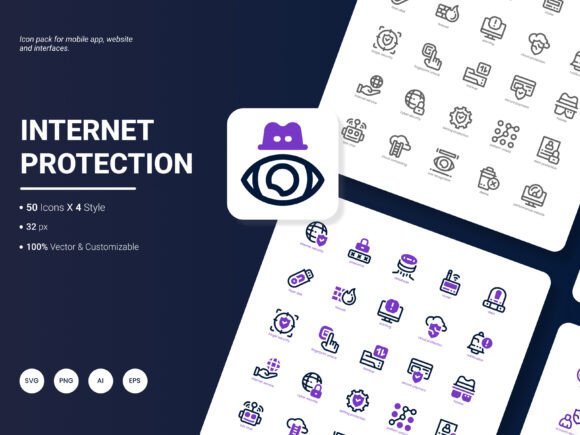
At its core, this icon pack is a curated collection of 200 icons focused on internet protection, security, privacy, and related digital services. It is designed for professionals who need reliable, ready-to-use visuals without spending hours creating them from scratch. The icons represent a mix of well-known services (such as VPNs, firewalls, antivirus tools, password managers, and secure payment platforms) and conceptual ideas (like data encryption, two-factor authentication, safe browsing, and network protection).
The pack stands out because it balances breadth with consistency. Each icon shares a cohesive visual style, which means you can mix and match them across a project without jarring mismatches. Whether you are working on a website, a mobile application, an infographic, or a slide deck, the icons feel like they belong together.
Core Strengths of the Icon Set
Understanding what makes this pack useful means looking beyond the count of 200 icons. A few key characteristics define its value in real-world use.
A Thoughtful Range of Subjects
The pack covers both brand-specific services (like popular VPN providers or antivirus software) and generic security symbols. This mix is practical because it lets you reference real-world tools in a guide or comparison while also illustrating abstract ideas. For example, you might use a branded icon for a known password manager in a tutorial, then switch to a generic lock or shield icon for a general security recommendation.
Four Distinct Styles for Flexibility
One feature that immediately stands out is the inclusion of four style variants. This is not common in many icon packs. Having four styles means you can maintain visual consistency even when adapting to different design contexts. Maybe your web interface calls for outline icons, while your infographic benefits from filled or flat versions. The ability to switch styles without changing the underlying subject matter saves time and preserves brand cohesion.
Multiple File Formats for Seamless Integration
The pack is available in AI, EPS, SVG, PNG, PDF, and JPG formats. This range is practical. SVG files work well for web and responsive design because they scale without losing quality. PNG files with transparent backgrounds are ideal for presentations and digital mockups. AI and EPS formats give designers full control in vector editing software. PDF and JPG offer straightforward options for print or quick use. You do not need to convert files or worry about compatibility—the format you need is likely already there.
Editable and Customizable
Another strength is editability. Because the icons come in vector formats, you can change colors, resize, combine elements, or adjust strokes. This is especially helpful when you need to match a specific brand palette or adapt icons for dark mode. Rather than searching for an alternative, you can modify what you already have.
Practical Applications Across Different Environments
The value of any icon set becomes clear when you consider how it performs in actual projects. Here are several realistic use cases where this pack can make a difference.
Website and Mobile Application Design
If you develop websites or mobile apps, icons are part of your daily vocabulary. Navigation menus, feature highlights, call-to-action buttons, and status indicators all rely on icons to guide users. Using a dedicated internet protection icon pack means your security-related sections—like account settings, privacy controls, or data export features—will have clear, professional visuals. This improves user experience because visitors instantly recognize what each icon represents. For example, a small shield icon next to "Secure Connection" in a browser address bar is universally understood. The pack provides that kind of clarity at scale.
For mobile apps, where screen space is limited, icons do heavy lifting. A well-designed icon can replace a label entirely, freeing up room for other content. With 200 icons available, you can cover login screens, permission requests, notification toggles, and more without repeating the same symbol.
Presentations and Analytical Reports
Presentations and reports thrive on visual communication. Whether you are explaining a security framework to stakeholders or presenting data on cyber threats, icons help break up text and make information easier to digest. Using the same icon set throughout a slide deck or report creates a polished, professional look. For instance, you could use a locked padlock icon to indicate secure data transmission, a key icon for authentication methods, and a globe icon for network coverage. The four style options allow you to keep things visually interesting while maintaining coherence across slides.
Analytical reports often include charts and dashboards. Placing a small, consistent icon next to each metric or section header helps readers scan the document quickly. It also reinforces the theme of internet protection without requiring lengthy explanations.
Infographics and Educational Materials
Infographics rely heavily on icons to simplify complex ideas. If you are creating a guide about how to stay safe online, icons can illustrate steps like "Use a VPN," "Enable two-factor authentication," or "Update your software." The pack includes icons for each of these actions. Because the icons are editable, you can also adjust colors to match a specific campaign or brand. Teachers, bloggers, and publishers will find this especially useful for producing clear, engaging content that educates without overwhelming.
Templates for Creators and Freelancers
If you sell templates on marketplaces or create them for clients, having a reliable icon set is a strong asset. A template for a cybersecurity website, a privacy policy page, or a security audit checklist becomes more valuable when it includes professional icons. Buyers often prefer templates that are ready to use, with no need to source additional assets. Including icons from this pack in your template saves time and adds perceived value. The editable formats mean the end user can also customize them if needed, which is a practical bonus.
Marketing and Branding Materials
Marketers and business owners frequently produce materials that reference security or data protection. Landing pages, email campaigns, social media graphics, and product sheets all benefit from consistent iconography. If your product or service has a security angle—even indirectly—using dedicated internet protection icons reinforces trust. A padlock icon next to a "100% Secure Checkout" button is subtle but effective. Over time, consistent use of recognizable icons can strengthen brand recognition.
Benefits Related to Usability, Efficiency, and Communication
Beyond specific use cases, the icon pack delivers broader benefits that affect how you work and communicate.
Saves Time and Reduces Friction
Creating custom icons from scratch is time-consuming. Sourcing them from multiple free libraries often leads to inconsistency in style and quality. Having a single pack with 200 coordinated icons streamlines your workflow. You can search, select, and place what you need without switching contexts. The multiple formats mean you are unlikely to face compatibility issues, which reduces technical friction.
Improves Visual Communication
Icons are a universal language. They convey meaning faster than words and cross language barriers. In a global market, using clear internet protection icons helps your audience understand your message regardless of their native language. This is especially relevant for international websites, apps, and documents.
Enhances Professional Appearance
Consistent, high-quality icons elevate the perceived professionalism of any project. Sloppy or mismatched visuals can undermine trust—particularly in security-related contexts where professionalism directly affects credibility. Using a coherent icon set signals attention to detail, which matters to clients, users, and partners.
Practical Considerations When Using the Icon Pack
To get the most out of the Internet Protection Icon Pack, keep a few points in mind. First, think about your project's overall design language. Even with four style options, choose one style per project to maintain consistency. Mixing outline styles with filled styles in the same interface can confuse users.
Second, take advantage of editability. In vector editing software, you can adjust stroke thickness, round corners, or change colors to match your brand. This is especially useful when you need icons for both light and dark backgrounds. A small investment in customization goes a long way.
Third, consider organizing the icons by theme or function when you first download them. With 200 icons, creating folders like "Authentication," "Network Security," "Threats," and "Privacy Tools" will save time later. Most icon packs do not come pre-sorted, so a little upfront organization pays off.
Suggestions for Future Updates
If you use the pack and have ideas for improvement, the creators welcome input. Based on common needs in the design and security space, here are some themes that could enhance future versions. Including icons for emerging technologies like zero-trust architecture, biometric authentication (beyond fingerprints), and secure cloud storage services would keep the pack relevant. Another useful addition would be icons representing regulatory frameworks or compliance standards (such as GDPR, CCPA, or HIPAA) for professionals working in regulated industries. Adding more variant styles—like duotone or isometric—could also appeal to designers seeking even more visual diversity. Finally, an expanded set of device-specific icons (smart home devices, IoT sensors, wearables) would cover the growing perimeter of internet-connected tools that people use daily.
Whether you are designing a complex security dashboard or simply need a few icons for a blog post, the Internet Protection Icon Pack offers a solid foundation. With 200 icons, four styles, six formats, and editable files, it is built to adapt to your workflow rather than constrain it. Focus on the message you want to communicate, and let the icons handle the visual clarity.