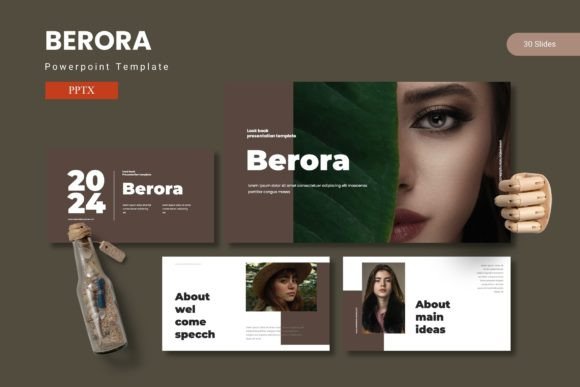
Berora Powerpoint Template: A Practical Tool for Visual Storytelling
Creating a presentation that holds attention and communicates clearly takes more than just good data. The visual structure, slide consistency, and ease of customization all play a role in how your message lands. For those who regularly build decks for clients, teams, or audiences, the Berora - Powerpoint Template offers a substantial set of tools designed to reduce friction and elevate output. This article takes a practical look at what this template includes, where it excels, and who will get the most out of it.
What the Berora Powerpoint Template Delivers
At its core, the Berora - Powerpoint Template is a large-scale slide collection built for PowerPoint users who need variety, visual polish, and reliable customization. With 150 total slides spread across five distinct color schemes, this template is not a one-off deck but a comprehensive toolkit. Each color scheme includes 30 slides, meaning you get a full deck’s worth of content in each of five variations. This structure is practical for presenters who work with multiple brands, pitch different styles to clients, or simply want options without starting from scratch.
The template includes section break slides, handcrafted infographics, gallery and portfolio layouts, and picture placeholders with drag-and-drop functionality. All graphics are resizable and editable, which is essential when you need to adapt visuals to specific content rather than forcing content into rigid layouts.
Slide Count and Structural Depth: More Than Just Quantity
A 150-slide count can sound overwhelming, but the value here lies in how those slides are organized. Rather than 150 variations of the same layout, the Berora - Powerpoint Template groups slides into functional categories. You get title slides, section dividers, content layouts, data visualization slides, timeline and process pages, portfolio and gallery slides, and closing elements. This diversity means you are not limited to one narrative flow. Whether you are building a sales pitch, an internal quarterly review, a conference talk, or a creative portfolio, the structure supports different kinds of storytelling.
Each of the five color folders contains 30 slides, so you have a complete mini-deck in every color option. This is particularly useful if you present to the same audience repeatedly but want to refresh the visual tone, or if you need to align with a client’s brand colors quickly.
Color Variations and Visual Consistency
Color is one of the most impactful yet time-consuming elements of presentation design. The Berora - Powerpoint Template addresses this by offering five premade color schemes, each applied consistently across its 30 slides. These are not random palettes; they are designed to work for professional contexts, with balanced contrast, readable text, and logical accent usage. For the user, this means you can switch between color variants without worrying about broken hierarchies or mismatched accents.
If you need to match a specific brand, the master slide-based structure makes global color changes straightforward. Because the template uses master slides, editing one element can update the entire deck. This is a significant time-saving feature for those who work under deadlines.
Infographics and Data Presentation Quality
Data slides often make or break a presentation. Poorly designed charts or inconsistent iconography can confuse an audience. The Berora - Powerpoint Template includes handcrafted infographics based on master slides, meaning the data visuals are built with care and consistency. These are not generic placeholder graphics; they are designed to be edited with your own numbers, labels, and icons while retaining visual balance.
For professionals who regularly present metrics, growth trajectories, comparisons, or process flows, these infographic slides reduce the time spent fiddling with shapes and alignment. The pixel-perfect illustrations also hold up well on larger screens, which matters for both live presentations and exported PDFs.
Usability and Customization in Practice
When evaluating any presentation template, ease of editing is the real test. The Berora - Powerpoint Template uses picture placeholders with drag-and-drop functionality. Instead of cropping or resizing images manually, you simply drop your image into the placeholder frame, and it adapts automatically. This may seem like a small detail, but when you are building a deck with dozens of images, it saves significant time.
Graphics are entirely resizable and editable. Vectors and icons can be recolored, scaled, or repositioned without losing quality. This flexibility is crucial for users who need to tailor every slide to their content rather than relying on a static layout. The template also includes gallery and portfolio slides, which are useful for designers, photographers, architects, and anyone whose work is visually driven.
The main file includes 5 PPTX items, each representing one color scheme with 30 slides. The folder also contains a Readme file and font and photo information, which helps avoid missing assets during setup. This level of organization suggests the template was built with the end user’s workflow in mind.
Who Benefits Most from This Template
The Berora - Powerpoint Template is not aimed at someone who needs a single, quick slide deck. Its strengths come from variety, consistency, and depth. The following groups are likely to find it most useful:
- Marketing professionals and agency teams who build multiple decks for different clients and need to switch between color schemes quickly.
- Freelance designers and consultants who want a polished, professional base to work from without reinventing layout structures for every project.
- Entrepreneurs and small business owners who present to investors, partners, or customers and need a clean, credible visual language.
- Educators and trainers who build curriculum materials, workshop slides, or lecture decks and want consistent infographic quality across modules.
- Content creators and publishers who repurpose presentations for slide sharing platforms, PDFs, or video exports and need pixel-perfect graphics that scale well.
- Bloggers and online course creators who use slides for visual content and want a library of templates that maintain a cohesive look over time.
For these users, the template’s 150-slide library functions as a reusable asset, not a one-time resource. Once downloaded, it can serve as the foundation for dozens of presentations across different topics and audiences.
Practical Recommendations and Use Cases
For a client pitch, the template allows you to quickly pull relevant slides from the 30-slide deck in the client’s preferred color scheme. You can mix section breaks, data slides, and portfolio pages without needing to design from scratch. For an internal quarterly review, the infographic slides help you present KPIs, timelines, and progress updates with a professional finish that reflects well on your team.
For conference presentations, the clean typography and balanced layout mean your content remains readable from the back of a large room. The gallery slides are particularly effective for creative professionals showcasing a body of work. If you are a freelancer, having five distinct color schemes at your disposal means you can reuse the same structural deck for different clients, adjusting only the palette and content.
One practical recommendation is to spend time reviewing the master slides before you begin editing. Understanding how the template is structured will let you leverage global edits effectively. This is especially useful if you plan to swap out fonts or adjust accent colors across the entire deck.
A Balanced Look at Limitations
No template is perfect for every situation, and the Berora - Powerpoint Template has a few considerations worth noting. First, because it offers five complete color schemes in separate files, you cannot easily mix colors from different schemes within the same deck without manual adjustments. If you need a custom palette that blends elements from two schemes, you will need to edit colors slide by slide or use the master slide to create a new unified palette.
Second, the template is built for PowerPoint. Users working primarily in Google Slides, Keynote, or other software may need to convert files, which can sometimes break formatting. While the template works well natively in PowerPoint, cross-platform compatibility is something to test early if your workflow involves multiple tools.
Third, with 150 slides, there is a learning curve to navigating the full library. Users who want a simple, five-slide template may find the quantity overwhelming. However, this is more a reflection of the template’s intended audience than a flaw. It is designed for depth, not minimalism.
Finally, the infographics are well-crafted, but they are still templates. For highly specialized data visualization needs, you may need to build custom charts outside the provided framework. The template gives you a strong starting point, but it does not replace dedicated analytics tools for complex datasets.
Final Thoughts on Long-Term Value
Templates like the Berora - Powerpoint Template earn their value through repeat use. If you build presentations regularly, the time saved across multiple projects often outweighs the upfront cost. The five color schemes, 150 slides, and handcrafted infographics provide a flexible foundation that can adapt to different industries, audiences, and content types. The emphasis on editable graphics, master slides, and drag-and-drop placeholders reflects a design philosophy that prioritizes efficiency and consistency.
For professionals who value presentation quality and need a scalable solution, this template offers a practical path to better-looking slides without the overhead of custom design each time. It is not a magic bullet, but it is a well-constructed tool that, when used thoughtfully, can improve both the speed and quality of your presentation workflow.