Derosa PowerPoint Template: A Practical Evaluation for Professional Presenters
When preparing a presentation, the quality of your slides can influence how your audience receives and retains your message. The Derosa PowerPoint Template is a slide deck designed to help users combine data, graphics, and content in a visually coherent way. Rather than promising instant transformation, this template offers a structured foundation that may save time and improve consistency for presenters who need to communicate complex ideas clearly. This article provides a balanced evaluation of the Derosa PowerPoint Template, exploring its features, potential benefits, tradeoffs, and the types of scenarios where it may or may not be the right fit for your needs.
What Is the Derosa PowerPoint Template?
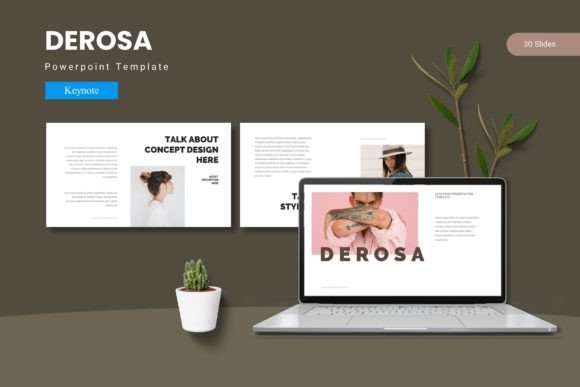
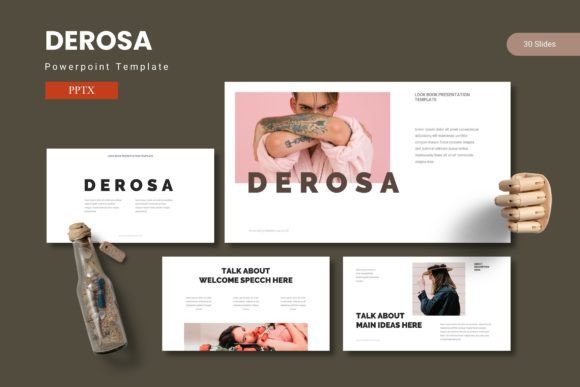
The Derosa PowerPoint Template is a pre-designed presentation package that includes 150 total slides organized across 5 premade color schemes. Each color scheme contains 30 slides, giving users a full deck for each variation without needing to start from scratch. The template incorporates section break slides, handcrafted infographics, and gallery or portfolio layouts, all built on master slides for consistent formatting. Graphics and illustrations are pixel-perfect, resizable, and editable, and the template includes picture placeholders that support drag-and-drop image insertion.
The main file package includes 5 PPTX files (one per color scheme), a Readme file, and information about fonts and photos used. This structure allows users to choose a color direction early and work within a coherent visual system, or switch between schemes depending on the audience or context.
Reasons You Might Consider the Derosa PowerPoint Template
People researching presentation templates often look for a balance between visual appeal and practical usability. The Derosa template addresses several common pain points:
- Slide volume: With 150 slides, the template covers a wide range of layouts, from title slides and section breaks to content slides, data visualizations, and portfolio pages. This reduces the need to create new slide layouts from scratch.
- Color flexibility: Five color variations allow you to match brand guidelines, client preferences, or presentation tone without redesigning the entire deck.
- Infographic support: Handcrafted infographic elements are included, which can help present data in a more digestible visual format without requiring advanced design skills.
- Master slide consistency: Because the template is built on master slides, changes made to fonts, colors, or spacing apply across the entire deck, saving time and ensuring uniformity.
- Editable assets: All graphics and illustrations are resizable and editable, meaning you can adjust them to fit your specific content rather than being locked into fixed visuals.
- Portfolio and gallery layouts: For users who need to showcase work, images, or case studies, dedicated gallery and portfolio slides provide a structured way to present visual content.
Benefits You Can Expect from Using This Template
If the Derosa PowerPoint Template aligns with your workflow, several practical benefits may follow:
Time savings. Starting with 30 slides per color scheme means you already have a foundation. Instead of designing each slide individually, you can focus on refining content and message. The drag-and-drop picture placeholders further speed up image placement, especially when working with multiple photos or screenshots.
Visual consistency. Templates that rely on master slides help ensure that headings, body text, bullet points, and graphic elements remain uniform across the entire presentation. This is particularly valuable when multiple team members contribute slides, as it reduces the risk of formatting drift.
Data communication. The handcrafted infographic elements are designed to present numbers, comparisons, and processes in a way that is easier for audiences to grasp quickly. For presentations that rely on data storytelling, these elements can support clarity without requiring you to build charts from scratch.
Adaptability across contexts. With five color schemes, you can use the same structural deck for different audiences. A conservative color scheme might suit an internal board meeting, while a bolder palette could work for a creative pitch or conference presentation.
Tradeoffs and Considerations to Keep in Mind
No template is a perfect fit for every situation, and the Derosa PowerPoint Template has limitations worth considering before making a decision.
Customization effort. While the template is editable, significant customization still requires time and attention. If your brand guidelines are highly specific or your content structure differs substantially from the provided layouts, you may need to modify slides more than anticipated. The template provides a strong starting point, but it is not a fully automated solution.
Learning curve with master slides. Users who are less familiar with PowerPoint's master slide functionality may find it unintuitive at first. Making global edits requires understanding how masters, layouts, and individual slides interact. The Readme file included in the package can help, but some trial and error may be necessary.
File size and performance. With 150 slides and embedded graphics, the file size can become large, especially if you insert high-resolution images into the picture placeholders. This may affect performance on older computers or when sharing files via email with attachment limits. Cloud storage or compression may be needed.
Font and photo dependencies. The template uses specific fonts and stock photos that are referenced in the included documentation. If you do not have the same fonts installed, your slides may render differently on your system or when shared with collaborators. You may need to substitute fonts, which can affect the intended visual balance.
Limited differentiation. Because the template is available to multiple users, presentations created with it may share a similar look. If your goal is to stand out with a highly distinctive visual identity, you may need to invest in additional customization or combine the template with original design work.
Scenarios Where the Derosa PowerPoint Template Is a Strong Fit
The Derosa template tends to work well in situations where efficiency and consistency are higher priorities than complete originality. Consider it if:
- You need a complete deck quickly. For time-sensitive presentations, having 30 slides per color scheme allows you to populate content immediately without designing from scratch.
- You present similar content to different audiences. The color variations let you maintain the same structure and messaging while adapting the visual tone for each group.
- You include data or infographics regularly. The handcrafted infographic elements support common data visualization needs, such as comparing metrics, showing processes, or illustrating hierarchies.
- You manage a team that collaborates on presentations. Master slide consistency helps multiple contributors produce slides that feel cohesive, even if each person works independently.
- You need portfolio or gallery layouts. If your presentation includes case studies, project showcases, or image collections, the dedicated slides provide a clean, structured format.
Scenarios Where Alternatives May Be Worth Considering
There are also situations where other templates or approaches might serve you better:
- You require highly branded, custom visuals. If your organization has strict brand guidelines with unique typography, color systems, and graphic treatments, you may need a custom-designed template rather than a pre-built one.
- Your content is non-standard or interactive. Presentations that rely heavily on video, animations, embedded media, or interactive elements may benefit from a more flexible or modular template approach.
- You work primarily in Google Slides or Keynote. The Derosa template is designed for PowerPoint (PPTX format). If your team uses alternative presentation software, you may experience compatibility issues or lose formatting fidelity during conversion.
- You need minimal slides or a very specific layout. With 150 slides, the template is comprehensive, but if you only need a small deck or a layout that deviates significantly from what is provided, you may spend more time stripping down or modifying slides than building from a simpler base.
- You prioritize unique differentiation. For high-stakes pitches or creative presentations where standing out visually is critical, a widely used template may not provide the distinctiveness you need. Custom design or a niche, less common template could be a better fit.
Practical Decision-Making Insights
To determine whether the Derosa PowerPoint Template aligns with your goals, consider the following practical steps:
Assess your typical presentation volume. If you create presentations frequently and value a reusable foundation, the 150-slide library and five color schemes offer long-term value. For one-off or infrequent presentations, a smaller or more specific template may suffice.
Evaluate your team's PowerPoint proficiency. If you or your collaborators are comfortable with master slides and basic customization, the template will feel intuitive. If not, factor in time for learning and troubleshooting, or consider a template with simpler, more self-contained layouts.
Test with your own content. Before committing to a purchase or full adoption, try adapting a few of your existing slides into the template. This will reveal how well the layouts accommodate your typical content mix, including text volume, image density, and data presentation needs.
Consider the total cost of ownership. Beyond the initial purchase price, factor in the time required to customize, the need for font licenses if the recommended fonts are not free, and potential storage or sharing constraints due to file size. A template that saves time in one area may require investment in another.
Compare with your existing workflow. If you already have a reliable slide library or internal template, the Derosa template should offer clear advantages in consistency, visual quality, or time savings to justify switching. If your current process works well, the benefit of a new template may be marginal.
Helping You Determine Alignment with Your Needs
The Derosa PowerPoint Template is a comprehensive, well-structured presentation resource that prioritizes volume, consistency, and data visualization support. For professionals who regularly prepare presentations and value a reliable starting point, it can reduce preparation time and improve visual coherence. The five color schemes and master slide foundation make it particularly useful for teams and for presenters who need to adapt content for different audiences without redesigning entirely.
However, it is not a substitute for custom brand design, and it requires some familiarity with PowerPoint's editing features to use effectively. Its strengths are most apparent in structured, content-heavy presentations where clarity and consistency matter more than visual novelty. For highly branded, interactive, or uniquely styled presentations, alternative approaches may serve you better.
Ultimately, the best template is the one that fits your content, your workflow, and your audience's expectations. By weighing the features and tradeoffs outlined here, you can make a more informed decision about whether the Derosa PowerPoint Template supports your presentation goals or whether another option is worth exploring.