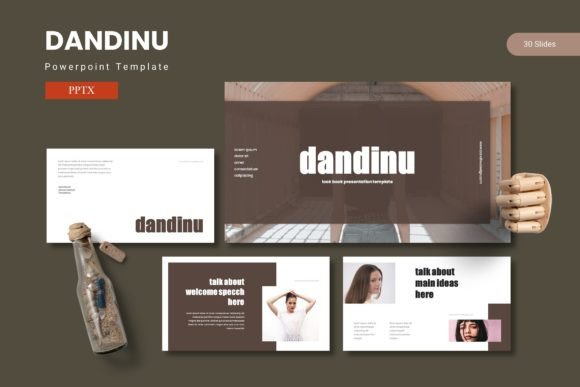
Dandinu – Powerpoint Template
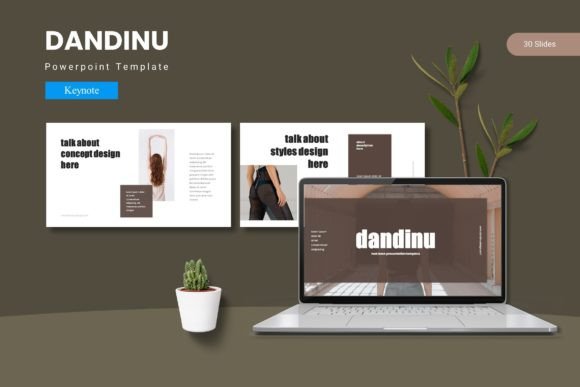
Every presentation starts with a blank slide and a deadline. The gap between the idea in your head and what actually appears on screen can be frustrating. You want something polished, but you also need speed. Dandinu – Powerpoint Template exists to close that gap. It gives you 150 slides spread across five color variations, each set built around a consistent visual language. Instead of spending hours adjusting alignment or hunting for matching icons, you drop your content into layouts that already work. The result is a presentation that looks intentional and professional, without the usual back-and-forth.
Why a well-structured slide library saves more than time
A template is only useful if it helps you think more clearly about your message. Dandinu – Powerpoint Template organizes its 150 slides into five distinct color schemes, with 30 slides per scheme. That structure matters because it forces a kind of creative discipline. When every slide in your deck follows the same palette and layout logic, your audience focuses on your argument instead of wondering why the colors changed between slides. The template includes section break slides, which serve as visual pauses. They let your audience reset between topics, making complex information easier to follow. For anyone who presents data-heavy content, those transitions are not decorative — they are functional.
The master slide approach keeps your formatting consistent
One of the quieter features in Dandinu – Powerpoint Template is its reliance on Master Slides. If you have ever tried to change a font across 50 slides manually, you understand the value. Master Slides allow you to update a single slide and have those changes ripple through every slide that inherits from it. This becomes especially useful when you are working with a team. Everyone can edit their own section, and the overall design stays intact. The template also provides pixel-perfect illustrations, which means each graphic element aligns precisely with the slide margins. You do not waste time nudging icons into position. They are already where they need to be.
How handcrafted infographics change the way you present data
Raw numbers rarely persuade an audience on their own. Context matters, and so does visual pacing. Dandinu – Powerpoint Template includes handcrafted infographics built directly into the slides. These are not generic charts you have to reformat. They are designed to work with the template’s existing color palette and layout structure. You can replace placeholder data with your own numbers and the infographic updates while keeping its visual logic intact. For marketers reporting campaign results or educators explaining a process, this removes a barrier. You do not need to be a designer to make data look clear. You just need a structure that guides the eye without distracting from the numbers.
Drag-and-drop picture placeholders for faster image integration
Images can make or break a slide. A poorly placed photo with uneven cropping pulls attention away from your message. Dandinu – Powerpoint Template addresses this with picture placeholders that support drag-and-drop. You insert an image, and it automatically fits into the designated area without distorting the aspect ratio. This is particularly useful for portfolio slides or gallery pages, where multiple images need to appear balanced. Freelancers and photographers, for instance, can build a portfolio deck in minutes. The gallery slides are pre-structured to display work cleanly, so the focus stays on the images themselves rather than the layout around them.
Practical benefits for entrepreneurs and small business owners
When you run a small business, every hour spent on slide design is an hour taken away from something else — product development, customer support, or strategy. Dandinu – Powerpoint Template reduces that time investment significantly. The five color schemes mean you can match a deck to your brand without customizing every element. If your brand colors shift, you can choose one of the prebuilt palettes or use the included variations as a starting point. The template also includes a separate folder with font and photo information, so you know exactly which resources are used. This transparency helps avoid licensing issues later, especially if you are handing the deck off to a client or collaborator.
Who benefits most from the 150-slide structure
Not every presentation needs 150 slides, but having that many available means you can pick only the ones that serve your specific goal. Educators preparing a semester-long lecture series can reuse the same template across multiple sessions while changing only the content. Bloggers creating webinar decks can maintain visual consistency across a series without rebuilding from scratch each time. The section break slides also help when you are recording video presentations. A clear visual break between topics gives viewers a natural moment to pause or reflect. The real benefit here is not the quantity of slides — it is the variety. You have enough layouts to match different content types without ever feeling forced into a design that does not fit.
Customizable layouts without the learning curve
Most presentation software offers deep customization, but that flexibility often comes with complexity. Dandinu – Powerpoint Template keeps customization accessible. All graphics are resizable and editable, which means you can adjust an icon’s size, change an infographic’s color, or move an element without breaking the overall layout. The template is built on a logic that assumes you may want to make changes, so nothing is locked. For creative professionals who need to adapt a deck to a client’s brand guidelines, this is a practical advantage. You can take the template as a foundation and then layer your own visual details on top without fighting the original design.
Limitations to consider before committing
While Dandinu – Powerpoint Template works well for a wide range of use cases, it is worth noting that its strength lies in structured presentations. If your work requires highly experimental layouts, animated transitions, or non-standard aspect ratios, you may find the template’s consistency limiting. The design prioritizes clarity and cohesion over visual novelty. That is a trade-off. For most business, educational, and marketing presentations, clarity wins. But if your presentation style leans toward the unconventional, you may want to test the template with a few slides before building an entire deck. Similarly, while the five color schemes offer good variety, they may not match every brand color exactly. You can adjust colors manually, but that adds a step. If color accuracy is critical, verify the palette against your brand guidelines early in the process.
Making the most of the included resources
The main file includes five PPTX files, each corresponding to one of the five color schemes. That separation is intentional. It lets you start with the palette that aligns best with your topic or brand, and it keeps the file sizes manageable. Each PPTX contains 30 slides, so you are never overwhelmed by too many options at once. The folder also includes a Readme file with font and photo information. Before you begin, check that the recommended fonts are available on your system. If they are not, the Readme tells you where to find them. Taking five minutes to install the fonts upfront saves you from formatting issues later. The same applies to the photo placeholders. Replace the sample images with your own as early as possible so you can see how the layout adjusts to your specific content.
Who should consider alternatives
Professionals who work with extremely technical data — engineering reports, scientific research, or financial modeling — may need slides that accommodate more granular charting or custom data visualization. Dandinu – Powerpoint Template provides solid infographic support, but it is designed for clarity rather than deep analytical detail. If your presentation relies on complex, interactive data exploration, you may want to supplement the template with additional tools or custom-built slides. Similarly, users who need strict accessibility compliance, such as high-contrast color ratios or screen-reader-friendly structures, should review the template’s default palette against WCAG guidelines before building their deck. The template can be adjusted, but the default settings may not meet every accessibility standard out of the box.
Final recommendations for getting started
Open the color scheme that feels closest to your topic, then spend ten minutes replacing placeholder images and text with your own content. Once you see how the template responds to your material, you will have a clearer sense of which slides to keep and which to adapt. The first deck you build with Dandinu – Powerpoint Template may take slightly longer as you familiarize yourself with the layout logic, but the second deck will be noticeably faster. Over time, the template becomes less of a design tool and more of a thinking tool — a framework that helps you organize your ideas before you even start writing. That shift from decorating slides to structuring messages is where the real value lives.